ballbot
Ballbot — ROS 2 Jazzy - PDE4430 Mobile Robotics
A comprehensive mobile robot platform for ROS 2 Jazzy with differential drive, LIDAR-based SLAM, and autonomous navigation capabilities.
Author: Aman Mishra
MISIS: M00983641
Email: am3971@live.mdx.ac.uk
License: Apache-2.0
ROS Distribution: Jazzy
Simulator: Gazebo Harmonic
Lecturer: Dr. Sameer Kishore
Program: MSc Robotics
University: Middlesex University Dubai
Table of Contents
- Video Demonstration
- Project Overview
- Robot Description
- Package Structure
- Prerequisites
- Installation
- Quick Start
- Package Documentation
- Assessment World
- Usage Examples
- Scripted Waypoint Navigation
- Known Issues
- Troubleshooting
- Contributing
Video Demonstration
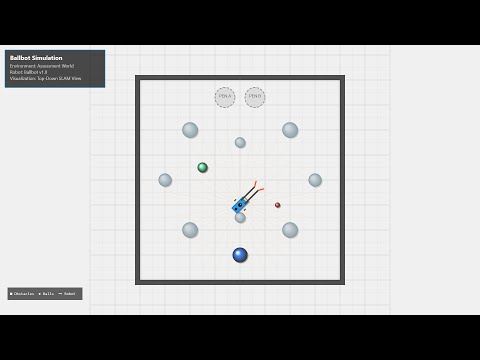
Project Overview
Ballbot is a differential-drive mobile robot designed for educational and research purposes in robotics. The project demonstrates a complete robotics software stack including:
- Robot Modeling: URDF/Xacro-based robot description with accurate physics
- Simulation: Full Gazebo Harmonic integration with sensors and actuators
- Control: ros2_control-based differential drive and position-controlled manipulator flaps
- Teleoperation: Custom keyboard teleoperation for driving and flap control
- SLAM: Real-time mapping using slam_toolbox
- Navigation: Autonomous navigation using Nav2 stack with AMCL localization
Key Features
- Differential drive locomotion with two powered wheels and a passive castor
- Dual articulated “collector arms” with controllable flaps for object manipulation
- 360° LIDAR sensor for mapping and obstacle detection
- IMU sensor integration (experimental)
- Support for both empty worlds and the PDE4430 assessment environment
Robot Description
Physical Specifications
| Component | Dimension | Description |
|---|---|---|
| Chassis | 0.30m × 0.65m × 0.30m | Main body (blue) |
| Drive Wheels | 0.05m radius, 0.04m width | Left and right powered wheels |
| Wheel Separation | 0.54m | Distance between wheel centers |
| Castor Wheel | 0.04m radius | Passive rear support |
| Collector Arms | 0.60m length | Fixed arms extending forward |
| Flaps | 0.25m length | Articulated end-effectors on arms |
| LIDAR | 360° scan, 10m range | Mounted on vertical pole |
Coordinate Frame
- base_footprint: Ground projection of the robot center
- base_link: Main chassis frame
- odom: Odometry frame (from wheel encoders)
- map: Global map frame (from SLAM/localization)
TF Tree
map
└── odom
    └── base_footprint
        └── base_link
            ├── left_wheel
            ├── right_wheel
            ├── castor_wheel
            ├── left_arm
            │   └── left_flap
            ├── right_arm
            │   └── right_flap
            ├── vertical_pole
            │   └── lidar_link
            └── imu_link
Package Structure
ballbot_ws/src/
├── ballbot_bringup/          # Top-level launch orchestration
├── ballbot_control/          # ros2_control configuration
├── ballbot_description/      # URDF/Xacro and meshes
├── ballbot_gazebo/           # Gazebo simulation launch
├── ballbot_imu/              # IMU integration (experimental)
├── ballbot_nav2/             # Nav2 configuration and launch
├── ballbot_slam/             # SLAM toolbox configuration
├── ballbot_teleop/           # Teleoperation nodes
└── ros2_assessment_world/    # Assessment environment
Prerequisites
System Requirements
- OS: Ubuntu 24.04 LTS (Noble Numbat)
- RAM: Minimum 8GB, recommended 16GB
- GPU: Discrete GPU recommended for Gazebo rendering
Software Dependencies
- ROS 2 Jazzy Jalisco
- Gazebo Harmonic
- Python 3.12+
Installation
1. Install Additional Dependencies
# Development tools
sudo apt install -y python3-colcon-common-extensions python3-rosdep python3-vcstool

# Gazebo and ROS-Gazebo integration
sudo apt install -y ros-jazzy-ros-gz ros-jazzy-gz-ros2-control

# Control packages
sudo apt install -y ros-jazzy-ros2-control ros-jazzy-ros2-controllers

# Navigation and SLAM
sudo apt install -y ros-jazzy-navigation2 ros-jazzy-nav2-bringup
sudo apt install -y ros-jazzy-slam-toolbox

# Visualization
sudo apt install -y ros-jazzy-rviz2 ros-jazzy-joint-state-publisher

# Initialize rosdep
sudo rosdep init || true
rosdep update
2. Clone and Build Workspace
# Create workspace
mkdir -p ~/ros2/ballbot_ws/src
cd ~/ros2/ballbot_ws/src

# Clone repository (replace with your repository URL)
git clone [https://github.com/mrrox1337/ballbot.git](https://github.com/mrrox1337/ballbot.git) .

# Install package dependencies
cd ~/ros2/ballbot_ws
rosdep install --from-paths src --ignore-src -r -y

# Build workspace
colcon build --symlink-install

# Source workspace
source install/setup.bash
3. Add to Shell Configuration (Optional)
echo "source /opt/ros/jazzy/setup.bash" >> ~/.bashrc
echo "source ~/ros2/ballbot_ws/install/setup.bash" >> ~/.bashrc
Quick Start
Launch Everything with Default Settings
The simplest way to run the complete system:
# Terminal 1: Launch simulation with SLAM
ros2 launch ballbot_bringup bringup.launch.py slam:=true teleop:=true

# Drive around to create a map, then save it
ros2 run nav2_map_server map_saver_cli -f ~/my_map
Launch Navigation with Pre-built Map
# Terminal 1: Launch simulation with navigation
ros2 launch ballbot_bringup bringup.launch.py navigation:=true

# Terminal 2: After setting 2D Pose Estimate in RViz, run commander
ros2 run ballbot_nav2 simple_commander
Package Documentation
ballbot_description
Purpose: Defines the robot’s physical structure, visual appearance, and sensor configuration.
Key Files:
urdf/ballbot.urdf.xacro- Main robot description filerviz/rviz.rviz- RViz visualization configurationlaunch/display.launch.py- Standalone visualization launch
Topics Published:
/robot_description(std_msgs/String) - URDF as string parameter
Standalone Usage:
# View robot in RViz (no simulation)
ros2 launch ballbot_description display.launch.py
ballbot_gazebo
Purpose: Integrates the robot with Gazebo Harmonic simulation environment.
Key Files:
launch/ballbot_gazebo.launch.py- Simulation launch file
Launch Arguments:
| Argument | Default | Description |
|———-|———|————-|
| world_type | empty | World to load: empty or assessment |
| use_sim_time | true | Use simulation clock |
Topics Bridged:
/clock- Simulation time/scan- LIDAR data (bridged separately in SLAM/Nav launches)
Standalone Usage:
# Launch with empty world
ros2 launch ballbot_gazebo ballbot_gazebo.launch.py world_type:=empty

# Launch with assessment world
ros2 launch ballbot_gazebo ballbot_gazebo.launch.py world_type:=assessment
ballbot_control
Purpose: Configures ros2_control for differential drive and flap position control.
Key Files:
config/ballbot_controllers.yaml- Controller parameterslaunch/ballbot_control.launch.py- Controller spawning launch
Controllers:
| Controller | Type | Interface |
|————|——|———–|
| joint_state_broadcaster | JointStateBroadcaster | State publishing |
| diff_drive_base_controller | DiffDriveController | Velocity command |
| flap_controller | ForwardCommandController | Position command |
Command Topics:
/diff_drive_base_controller/cmd_vel(geometry_msgs/TwistStamped) - Drive commands/flap_controller/commands(std_msgs/Float64MultiArray) - Flap positions
State Topics:
/joint_states(sensor_msgs/JointState) - All joint states/odom(nav_msgs/Odometry) - Wheel odometry
Standalone Usage:
# Launch Gazebo + Controllers
ros2 launch ballbot_control ballbot_control.launch.py world_type:=assessment
ballbot_teleop
Purpose: Provides keyboard-based teleoperation for driving and flap control.
Key Files:
ballbot_teleop/teleop_flap_node.py- Main teleoperation node
Controls:
Moving:
   w
 a s d
   x

q/z : increase/decrease max speeds by 10%
w/x : linear movement (forward/back)
a/d : angular movement (left/right)
s   : force stop

Flap Controls:
1 : Reset Flaps (0.0, 0.0)
2 : Open Flaps  (-0.5, 0.5)
3 : Close/Grip  (-1.57, 1.57)

CTRL-C to quit
Standalone Usage:
# Run teleop node (requires controllers to be running)
ros2 run ballbot_teleop teleop_flap_node
ballbot_slam
Purpose: Performs simultaneous localization and mapping using slam_toolbox.
Key Files:
config/slam_async_config.yaml- SLAM parameterslaunch/online_async_slam.launch.py- Complete SLAM launchmaps/assessment_map.yaml- Pre-built assessment world mapmaps/assessment_map.pgm- Map image file
SLAM Configuration:
- Mode: Asynchronous online SLAM
- Resolution: 0.05m per pixel
- Laser Range: 0.1m to 10.0m
- Map Update Interval: 2.0 seconds
Topics:
/map(nav_msgs/OccupancyGrid) - Generated map/scan(sensor_msgs/LaserScan) - LIDAR input
Standalone Usage:
# Launch complete SLAM system
ros2 launch ballbot_slam online_async_slam.launch.py world_type:=assessment

# Save the map after exploring
ros2 run nav2_map_server map_saver_cli -f ~/ros2/ballbot_ws/src/ballbot_slam/maps/my_map
ballbot_nav2
Purpose: Provides autonomous navigation using the Nav2 stack.
Key Files:
config/ballbot_nav2_params.yaml- Complete Nav2 parameterslaunch/navigation.launch.py- Navigation stack launchballbot_nav2/cmd_vel_relay.py- Twist to TwistStamped converterballbot_nav2/simple_commander.py- Example goal sender
Nav2 Components:
- Localization: AMCL (Adaptive Monte Carlo Localization)
- Planning: NavFn global planner
- Control: DWB local planner
- Recovery: Spin, backup, wait behaviors
Robot Footprint:
[[1.0, 0.35], [1.0, -0.35], [-0.27, -0.35], [-0.27, 0.35]]
This accounts for the extended arms and flaps.
Important: After launching navigation, you must set a 2D Pose Estimate in RViz before the robot can navigate. The AMCL localization needs an initial pose to start.
Standalone Usage:
# Terminal 1: Launch navigation
ros2 launch ballbot_nav2 navigation.launch.py

# In RViz: Click "2D Pose Estimate" and set robot's approximate position

# Terminal 2: Send navigation goal (after setting pose estimate)
ros2 run ballbot_nav2 simple_commander
ballbot_bringup
Purpose: Unified launch system for all robot configurations.
Key Files:
launch/bringup.launch.py- Master launch file
Launch Arguments:
| Argument | Default | Description |
|---|---|---|
world |
assessment |
World to load: assessment or empty |
teleop |
false |
Launch teleoperation in new terminal |
slam |
false |
Enable SLAM mapping |
navigation |
false |
Enable Nav2 navigation stack |
spawn_balls |
false |
Spawn balls in assessment world |
use_sim_time |
true |
Use simulation time |
Usage Examples:
# Basic simulation (just robot in assessment world)
ros2 launch ballbot_bringup bringup.launch.py

# Simulation with balls spawned (Assessment world only)
ros2 launch ballbot_bringup bringup.launch.py spawn_balls:=true

# Simulation with teleoperation
ros2 launch ballbot_bringup bringup.launch.py teleop:=true

# SLAM mapping session
ros2 launch ballbot_bringup bringup.launch.py slam:=true teleop:=true

# Autonomous navigation (remember to set 2D Pose Estimate!)
ros2 launch ballbot_bringup bringup.launch.py navigation:=true

# Empty world for testing
ros2 launch ballbot_bringup bringup.launch.py world:=empty teleop:=true
Important Notes:
slamandnavigationare mutually exclusive - don’t enable both- When using
navigation, manually set 2D Pose Estimate in RViz before sending goals - The
simple_commandernode should be run manually after navigation is ready
ballbot_imu (Experimental)
Status: ⚠️ Experimental - Not integrated into main system
Purpose: Attempted integration of IMU sensor fusion for improved localization.
This package was developed to emulate a BNO055 absolute orientation sensor and fuse IMU data with wheel odometry for more robust localization. While the sensor simulation works, the full integration with the localization stack was not completed.
What Works:
- IMU sensor plugin in URDF
- Gazebo IMU bridge
- IMU processor node emulating BNO055 characteristics
- Complementary filter for sensor fusion
What’s Not Integrated:
- robot_localization EKF fusion
- Integration with SLAM or Nav2
For Future Development:
The ballbot_imu package can serve as a starting point for:
- Implementing robot_localization with IMU + wheel odometry fusion
- Adding IMU-based orientation estimation for rough terrain
- Sensor fusion research and experimentation
node_graphs
Refer to the node_graphs sub-folder for detailed RQT visualization while teleoperating, mapping, and navigating.
tf2_frames
Refer to the tf2_frames sub-folder for detailed robot transform visualization while navigating notice how the robot listens to the /map topic to the /odom and then the pose information is distributed to the rest of the robot body.
Assessment World
The ros2_assessment_world package provides the PDE4430 assessment environment.
Environment Specifications
- Arena Size: 8m × 8m enclosed area
- Wall Height: 2m
- Pen Areas: Two collection zones at coordinates (±0.6, 3.3)
- Obstacles: 9 cylindrical obstacles of varying sizes (0.2m - 0.5m diameter)
Spheres
Three colored spheres spawn at random locations:
- Red (Small): 0.1m radius, 0.3kg
- Green (Medium): 0.2m radius, 0.6kg
- Blue (Large): 0.3m radius, 1.0kg
Assessment Task
- Navigate the environment while avoiding obstacles
- Locate and collect the three spheres
- Transport spheres to the pen areas using the flap mechanism
Launching Assessment World
# Via bringup (recommended)
ros2 launch ballbot_bringup bringup.launch.py world:=assessment

# Standalone (world only, no robot)
ros2 launch assessment_world assessment_complete.launch.py
Usage Examples
Example 1: First-Time Setup and Testing
# Terminal 1: Launch basic simulation with balls spawned
ros2 launch ballbot_bringup bringup.launch.py spawn_balls:=true teleop:=true

# Use WASD keys to drive, 1/2/3 to control flaps
# Press Ctrl+C to exit
Example 2: Creating a New Map
# Terminal 1: Launch SLAM
ros2 launch ballbot_bringup bringup.launch.py slam:=true teleop:=true

# Drive around the entire environment to build a complete map
# Watch the map build in RViz

# Terminal 2: Save the map when done
ros2 run nav2_map_server map_saver_cli -f ~/ros2/ballbot_ws/src/ballbot_slam/maps/new_map

# Update ballbot_nav2/config/ballbot_nav2_params.yaml with new map path if needed
Example 3: Autonomous Navigation
# Terminal 1: Launch navigation
ros2 launch ballbot_bringup bringup.launch.py navigation:=true

# In RViz:
# 1. Click "2D Pose Estimate" button
# 2. Click and drag on the map where the robot actually is
# 3. Wait for AMCL particle cloud to converge

# Terminal 2: Send a navigation goal
ros2 run ballbot_nav2 simple_commander

# Or use RViz "2D Goal Pose" button to send goals interactively
Example 4: Manual Navigation Goal via CLI
# After navigation is running and localized:
ros2 action send_goal /navigate_to_pose nav2_msgs/action/NavigateToPose \
  "{pose: {header: {frame_id: 'map'}, pose: {position: {x: 2.0, y: 1.0, z: 0.0}, orientation: {w: 1.0}}}}"
Scripted Waypoint Navigation
The ballbot_nav2 package provides two commander scripts for autonomous navigation using the Nav2 Simple Commander API:
| Script | Purpose |
|---|---|
simple_commander |
Navigate to a single goal position |
waypoint_commander |
Navigate through multiple waypoints in sequence |
Prerequisites: Setting Up Navigation
Before running either commander, you must:
Step 1: Launch Navigation Stack
ros2 launch ballbot_bringup bringup.launch.py navigation:=true
Step 2: Set Initial Pose in RViz
AMCL needs to know where the robot is before it can navigate:
- In RViz, click the “2D Pose Estimate” button in the toolbar
- Click on the map where the robot is currently located
- Drag to set the orientation (direction the robot is facing)
- Wait a few seconds for the AMCL particle cloud to converge around the robot
You’ll know localization is working when the green particle cloud tightens around the robot’s position.
Simple Commander (Single Goal)
Sends the robot to a single predefined goal position.
Run:
ros2 run ballbot_nav2 simple_commander
Default Goal: x=1.0, y=0.0 (1 meter forward from origin)
File Location: ~/ros2/ballbot_ws/src/ballbot_nav2/ballbot_nav2/simple_commander.py
Waypoint Commander (Multiple Waypoints)
Sends the robot through a sequence of waypoints.
Run:
ros2 run ballbot_nav2 waypoint_commander
File Location: ~/ros2/ballbot_ws/src/ballbot_nav2/ballbot_nav2/waypoint_commander.py
Adding or Modifying Waypoints
Open waypoint_commander.py and locate the waypoints list:
waypoints = [
    {'x': 1.0,  'y': 0.0,  'yaw': 0.0},      # Waypoint 1
    {'x': 2.0,  'y': 1.0,  'yaw': 1.57},     # Waypoint 2
    {'x': 0.0,  'y': 0.0,  'yaw': 0.0},      # Waypoint 3: return to start
]
Each waypoint is a dictionary with three values:
| Parameter | Type | Description |
|---|---|---|
x |
float | X coordinate in meters (map frame) |
y |
float | Y coordinate in meters (map frame) |
yaw |
float | Orientation in radians |
Yaw (Orientation) Reference:
| Yaw Value | Direction |
|---|---|
0.0 |
Facing +X (right on map) |
1.57 (π/2) |
Facing +Y (up on map) |
3.14 (π) |
Facing -X (left on map) |
-1.57 (-π/2) |
Facing -Y (down on map) |
Assessment World Coordinate Reference
                    Y+
                    ↑
        (-4,4) _____|_____ (4,4)
              |   |   |   |
              |   |Pen|   |
              |   |   |   |
              |           |
        -X ←  |   (0,0)   | → +X
              |           |
              |___________|
       (-4,-4)            (4,-4)
                    ↓
                    Y-
Key Locations:
- Center/Origin: (0.0, 0.0)
- Left Pen Area: approximately (-0.6, 3.3)
- Right Pen Area: approximately (0.6, 3.3)
- Wall boundaries: ±4.0 meters in both X and Y
Example Waypoint Configurations
Navigate to Pen Areas:
waypoints = [
    {'x': 0.0,  'y': 1.0,  'yaw': 1.57},    # Move forward, face pen
    {'x': -0.6, 'y': 3.0,  'yaw': 1.57},    # Go to left pen
    {'x': 0.6,  'y': 3.0,  'yaw': 1.57},    # Go to right pen
    {'x': 0.0,  'y': 0.0,  'yaw': 0.0},     # Return to center
]
Patrol the Perimeter:
waypoints = [
    {'x': 3.0,  'y': 0.0,  'yaw': 1.57},    # Right side
    {'x': 3.0,  'y': 3.0,  'yaw': 3.14},    # Top-right corner
    {'x': -3.0, 'y': 3.0,  'yaw': -1.57},   # Top-left corner
    {'x': -3.0, 'y': -3.0, 'yaw': 0.0},     # Bottom-left corner
    {'x': 3.0,  'y': -3.0, 'yaw': 1.57},    # Bottom-right corner
    {'x': 0.0,  'y': 0.0,  'yaw': 0.0},     # Return to center
]
After Modifying Waypoints
If you used --symlink-install during the initial build, Python file changes take effect immediately - no rebuild needed.
Otherwise, rebuild the package:
cd ~/ros2/ballbot_ws
colcon build --symlink-install --packages-select ballbot_nav2
source install/setup.bash
Known Issues
The following are known limitations of the current implementation:
1. Manual Initial Pose Required
Before running any navigation script (simple_commander or waypoint_commander), the robot’s initial pose must be set manually in RViz using the “2D Pose Estimate” tool. Programmatic initialization of the initial pose has not been implemented yet.
Workaround: Always set the 2D Pose Estimate in RViz and wait for the AMCL particle cloud to converge before running navigation commands.
2. Odometry-Only Localization (No IMU Fusion)
The robot currently relies solely on wheel odometry for pose estimation. The IMU sensor integration (ballbot_imu package) was attempted but not fully integrated into the localization stack.
Impact: When the robot turns, it calculates its orientation based on how much the wheels have rotated. If the robot collides with an obstacle or experiences wheel slip, the odometry becomes inaccurate. This causes:
- Consistent buildup of orientation error over time
- Map “spinning out” during SLAM mapping sessions
- Localization drift during navigation
Workaround:
- Avoid collisions with obstacles during mapping and navigation
- For SLAM, drive slowly and smoothly to minimize odometry error
- Re-localize periodically by setting a new 2D Pose Estimate if drift becomes noticeable
3. Unreliable Waypoint Navigation
Due to the odometry drift issue described above, the waypoint_commander does not work reliably for longer waypoint sequences. As the robot navigates through multiple waypoints, accumulated orientation error causes it to increasingly miss target positions.
Workaround:
- Use fewer waypoints with shorter distances between them
- Use
simple_commanderfor single-goal navigation which is more reliable - Manually intervene with 2D Pose Estimate corrections if the robot becomes significantly mislocalized
4. No Autonomous Ball Detection or Collection
The robot has no awareness of the colored spheres that spawn in the assessment world. It cannot:
- Detect the location of the red, green, and blue spheres
- Autonomously navigate to collect them
- Autonomously transport them to the pen areas
Current capability: The flaps can be controlled manually via teleoperation (keys 1, 2, 3) to push or grip spheres, but all ball collection must be done through manual teleoperation.
Future improvement: This would require:
- Adding a camera sensor to the robot
- Implementing computer vision for colored sphere detection
- Creating a behavior tree or state machine for autonomous collection
Troubleshooting
Common Issues
Gazebo doesn’t start or crashes
# Check Gazebo installation
gz sim --version

# Try with OGRE rendering (more compatible)
# This is already set in the launch files for assessment world
Robot doesn’t move with teleop
- Ensure controllers are loaded:
ros2 control list_controllers - Check that topics are connected:
 ros2 topic list | grep cmd_vel
 ros2 topic echo /diff_drive_base_controller/cmd_vel
SLAM map not building
- Verify LIDAR data:
ros2 topic echo /scan --once - Check TF tree:
ros2 run tf2_tools view_frames
Navigation fails to start
- Ensure map file exists at the configured path
- Check lifecycle states:
 ros2 lifecycle list /map_server
 ros2 lifecycle list /amcl
Robot spins or behaves erratically during navigation
- Always set 2D Pose Estimate first - AMCL needs initial localization
- Check that the map matches the current world
- Verify odometry is working:
ros2 topic echo /odom
Useful Debugging Commands
# List all active nodes
ros2 node list

# List all topics
ros2 topic list

# Check topic frequency
ros2 topic hz /scan

# View TF tree
ros2 run tf2_tools view_frames

# Monitor transforms
ros2 run tf2_ros tf2_echo map base_footprint

# Check controller status
ros2 control list_controllers
ros2 control list_hardware_interfaces
Contributing
Development Workflow
- Create a feature branch
- Make changes with
--symlink-installfor faster iteration:colcon build --symlink-install --packages-select <package_name> - Test thoroughly
- Update documentation
- Submit pull request
Code Style
- Python: Follow PEP 8, use type hints where practical
- Launch files: Use Python launch format
- YAML: Use consistent 4-space indentation
Adding New Packages
- Create package with
ament_pythonbuild type - Add appropriate dependencies to
package.xml - Include launch files and configs in
setup.pydata_files - Update this README with package documentation
License
This project is licensed under the Apache License 2.0. See individual package LICENSE files for details.
Acknowledgments
- ROS 2 Community
- Gazebo Development Team
- Nav2 Project Contributors
- slam_toolbox Developers
- Dr. Sameer Kishore
- Google Gemini
- Anthropic Claude
Last Updated: December 2025
ROS 2 Version: Jazzy Jalisco
Gazebo Version: Harmonic